RedactDrop › Guides › When a redaction can be copy-pasted away: a 2025 case, explained
When a redaction can be copy-pasted away: a 2025 case, explained
Published 28 September 2026 · by Tekiba
Short answer: in December 2025, readers of some newly published government PDFs found that text under the black boxes could be selected, copied and pasted into another document. A black box drawn over text only covers it; the text is still in the file. The fix is to take the words out of the file, then check the result with a copy, an extractor and a look at the file's hidden parts.
This article covers the technique only: not what the documents contain, who is named in them, or anything uncovered.
What was reported
In December 2025 the US Department of Justice published a large set of documents as PDF files — nearly 30,000 of them, according to a Mediaite report of 24 December 2025, republished by Yahoo News. Within days, readers reported “blacked-out text becoming visible with a simple copy and paste” in some of the files: the blackout was “easily sidestepped by simply copying the text into a separate document”, where the words appeared as ordinary text.
Reports describe the effect, not the tool that produced the files or how they were built, and they do not say how many files were affected. What the effect shows is that the words were still in the files as text, under a blackout that only covered them.
How a covered word can still be copied
One way this happens is a black shape drawn over text. A PDF page is a list of drawing instructions — show these characters here in this font, fill this rectangle there — that a viewer carries out in order (ISO 32000-1, 7.8.2 “Content Streams” and 9.4.3 “Text-Showing Operators”). A black box added with a drawing tool, a shape, or a highlighter set to black is one more instruction at the end: fill a rectangle. Your eyes see the rectangle, because it is drawn last. Copying, searching, screen readers and text extractors do not look at the pixels; they read the text-showing instructions, and those still hold the characters.
It is not the only way. Text can also stay behind as an invisible layer, such as the one OCR adds under a scanned page (ISO 32000-1, 9.3.6 “Text Rendering Mode”), or as replacement text that copying uses instead of what the page shows (14.9.4 “Replacement Text”). Each looks redacted on screen and on paper until someone copies the black.
A made-up example you can reproduce
Here is a short, invented interview record. The person's name and email address were covered with black rectangles and nothing else was done to the file — one way to produce the effect in the reports.
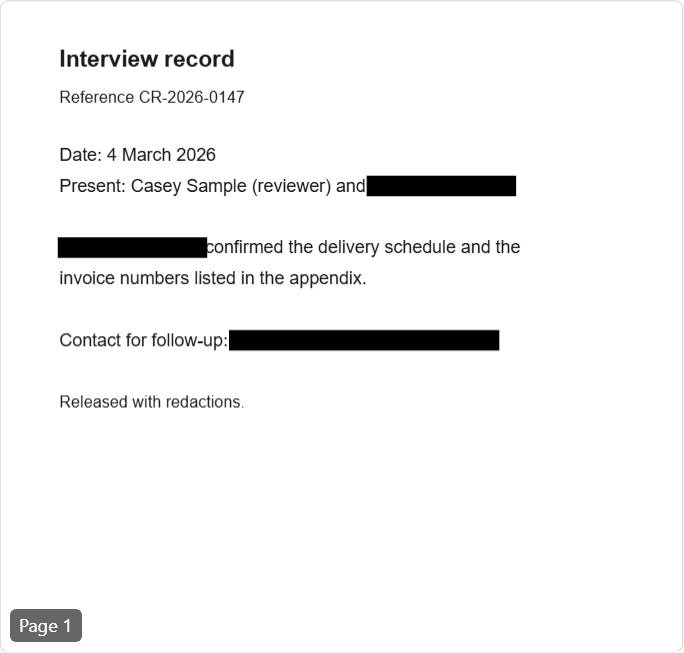
A free text extractor, pdftotext 4.06 from Xpdf, reads it like this:
$ pdftotext -layout memo-boxed.pdf -
Interview record

Reference CR-2026-0147

Date: 4 March 2026
Present: Casey Sample (reviewer) and Drew Placeholder

Drew Placeholder confirmed the delivery schedule and the
invoice numbers listed in the appendix.

Contact for follow-up: [email protected]

Released with redactions.
Every covered word is there, and so are the title and author in the file's document information.
This is an old lesson
The mistake is not new. In December 2005 the US National Security Agency published guidance called “Redacting with Confidence”, on reports converted from Word to PDF, which dealt with redaction done in Word — black boxes over text among it — that can be reversed once the document is converted to PDF (Homeland Security Digital Library, 20 January 2006). The Federation of American Scientists, which made the guidance public in January 2006, summed up one of its warnings: merely converting a Word document to PDF “does not remove all [sensitive] metadata automatically” (FAS, 20 January 2006). The point of that guidance is the one this case shows again: the information has to be removed from the document, not just hidden from view.
The PDF specification builds the same idea into its own redaction feature. Content is first marked for removal, and when the marks are applied “the content in the area specified by the redact annotations is removed” (ISO 32000-1, 12.5.6.23 “Redaction Annotations”). The removal is exactly the step a drawn box leaves out.
Three checks to run on your own redacted PDF
None of these needs special software.
- Select all, then copy and paste. Open the redacted file, press Ctrl+A (Cmd+A on a Mac) and watch the black areas: if the selection highlight appears on words under the black, those words are still there. Copy, paste into a plain text editor, and read what arrives. Search the file for part of each word as well — a surname on its own, the last four digits of a number.
- Extract the text with a second tool. Run
pdftotext, or open the file in a different viewer and export it as text. A second reader catches text that the first viewer hides or draws in an unusual way. - Look at the parts no page shows. Document Properties for the title, author, subject and keywords; the attachments panel for files inside the PDF; the comments panel for notes and form fields. Each of these can repeat a name that the pages no longer show (see removing metadata from a PDF).
What RedactDrop does with the same record
Given the name and the email address, RedactDrop takes the instructions that draw them out of the page, paints the places black, and rebuilds the file from what the pages need, so the document information is not copied. It then opens the new file again with a separate reader and refuses to offer it if any page fails. On this record it removed 3 matches on 1 page and reported:

And the same extractor on the output:
$ pdftotext -layout memo-redacted.pdf -
Interview record

Reference CR-2026-0147

Date: 4 March 2026
Present: Casey Sample (reviewer) and

                        confirmed the delivery schedule and the
invoice numbers listed in the appendix.

Contact for follow-up:

Released with redactions.
Run the three checks on the output anyway. A tool's own check can only find what it looks for, and what “verified” means is worth knowing before you rely on it. Words inside images are not found, because RedactDrop does no OCR.
Remove the words, not just cover them. RedactDrop works in your browser, and the PDF is not uploaded. Open the redaction page.
Questions
How can text under a black box be copied?
The box is drawn on top of the text, and the text is still in the file. Copying and searching read the text itself, not the picture on screen, so they find the words under the box.
Does saving or printing to PDF again remove the covered text?
Not reliably. Printing or saving to PDF usually keeps text as text, so words under a drawn box can come through into the new file along with the box.
How do I check a redacted PDF before publishing it?
Select all and paste into a text editor, extract the text with a second tool such as pdftotext, and look at the document properties, attachments and comments for the words you removed.
Would flattening the page into an image help?
An image of the page has no text to copy, but the file can still carry metadata, attachments and comments, and it loses selectable text for every reader. Removing the words and checking the file keeps the rest of the page usable.