RedactDrop › Guides › Redacting third-party information in a subject access request (UK GDPR)
Redacting third-party information in a subject access request (UK GDPR)
Published 28 September 2026 · by Tekiba
Short answer: when the documents a person asks for also identify other people, the UK regulator's guidance asks three questions: does disclosure identify someone else, have they consented, and is it reasonable to disclose without consent? Where you hold something back, you still give as much as you can — usually by redacting only what identifies the other person — and you record what you decided and why. In a PDF that means names and email addresses, but also quoted messages, copy lines and the file's own author field.
Not legal advice. This article explains the published guidance and how to redact a PDF. For a particular request, read the guidance itself and take advice where you need it.
SAR or DSAR: the same right
The right of access is Article 15 of the GDPR, which the UK kept as the UK GDPR. The UK regulator, the Information Commissioner's Office (ICO), calls a request under it a subject access request, or SAR. Many organisations, in the UK and the EU, say data subject access request, or DSAR. This article follows the UK rules and the ICO's wording.
The right has a limit built in. The right to a copy “shall not adversely affect the rights and freedoms of others” (UK GDPR, Article 15(4)), and the Data Protection Act 2018 says a controller is not obliged to disclose information “to the extent that doing so would involve disclosing information relating to another individual who can be identified from the information” (DPA 2018, Schedule 2, paragraph 16(1)).
The ICO's three questions
The ICO's guidance, “When can an exemption apply to information about other people in a SAR?” (last updated 8 December 2025), sets out the decision in three steps:
- “Does the request require disclosing information that identifies another person?” If the other person cannot be identified from what you would send, the question does not arise. Context can identify someone as well as a name.
- “Has the other person provided consent?” If they have, you disclose. The guidance adds that you are not obliged to ask — for example where you have no way of contacting them.
- “Is it reasonable to disclose without consent?” The Act lists what to weigh: the type of information, any duty of confidentiality owed to the other person, the steps you took to seek consent, whether they are capable of giving it, and any express refusal (DPA 2018, Schedule 2, paragraph 16(3)).
Disclose as much as you can, and write the decision down
Holding back information about someone else does not mean holding back the document. The ICO says you “must still provide as much of the requested information as you can, without disclosing the third party's identity”, editing or redacting where that is appropriate. Often that means removing their name, their address and the details that point to them, and leaving the rest; but where a whole passage would still identify them — for example because the requester knows the events it describes — more may have to be withheld.
The same guidance says you “should keep a record of what you decide and why”. A short note per document is enough: what was removed, whose it was, and which question decided it.
What identifies someone in a PDF
Documents gathered for a request are often emails, chat exports and letters saved or printed to PDF. The obvious targets are names and email addresses, but they are rarely the only ones:
- Header and copy lines. From, To and Cc lines name the other people on a thread, with their addresses.
- Quoted messages. A reply often quotes an earlier message under a line such as “On 11 May, Pat Manager wrote:”. The attribution names the writer; the quoted words may identify them too, by what they say.
- Short forms. A first name on its own, initials, a nickname in a sign-off.
- The file itself. A PDF's document information can record an author, often the person who saved the file — who may be the third party. Comments, attachments and earlier saved versions can carry names as well (see removing metadata from a PDF).
And the redaction itself has to remove the text, not cover it. A black box drawn over a name leaves the name in the file, where it can be copied out — the failure explained in when a redaction can be copy-pasted away.
An example
Here is a made-up email thread printed to PDF. The requester is Alex. Jamie wrote the reply and Pat was copied in; neither has consented, and in this example the decision was to withhold their identities. The file's author field says “Pat Manager”.
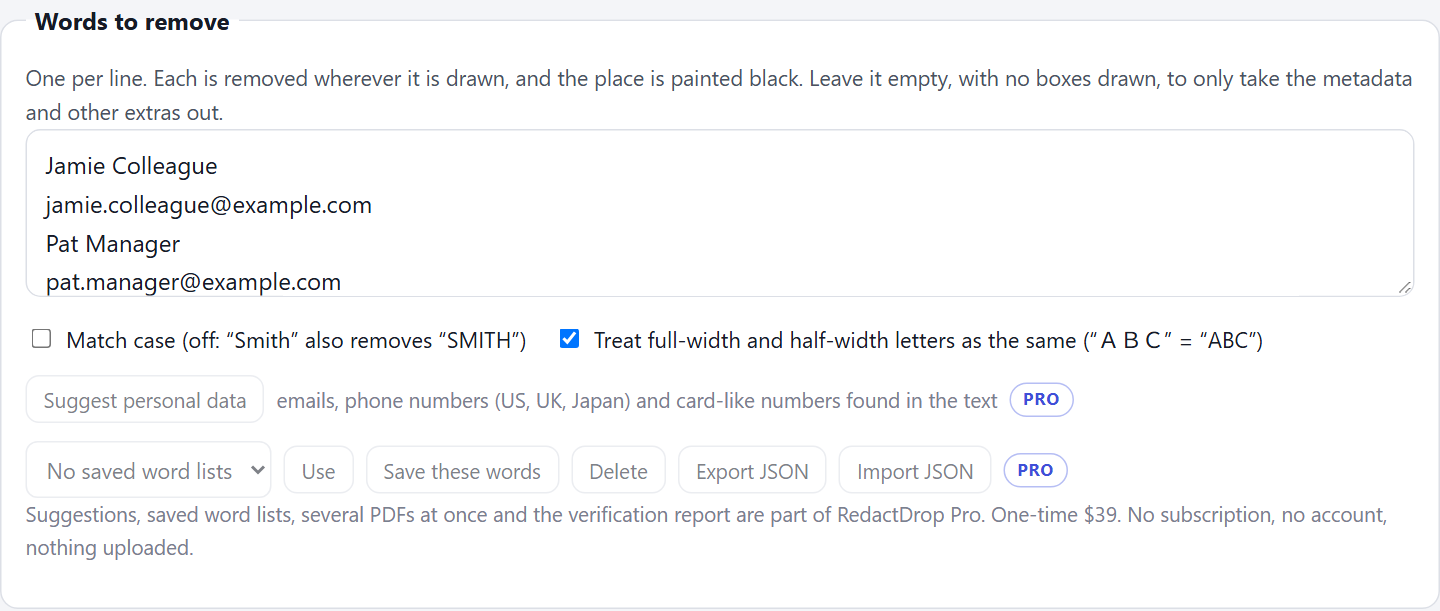
On the RedactDrop redaction page, the words to remove are the two names, both addresses, and the short forms “Jamie” and “Pat” used in the body:
RedactDrop removed 13 matches on 1 page, rebuilt the file without the document information, and checked the new file before offering it: “Verified: 0 matches remain, 0 metadata fields, 0 annotations.”
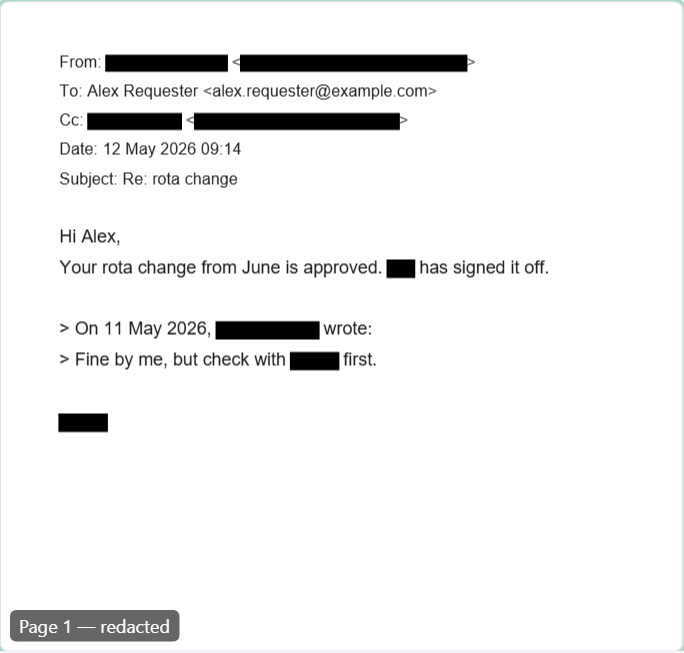
After a short word like “Pat”, look at every page: the page shows each place a word was removed, so you can see whether it caught something you meant to keep. Then add the note to your record.
Limits to know
- RedactDrop finds text. Scanned pages and names inside images are not found, because it does no OCR; draw a box over those yourself.
- It removes the words you list. Deciding what identifies someone — the three questions — stays with you.
- The free version handles one PDF of up to three pages. RedactDrop Pro takes several files at once and keeps saved word lists, so one list of names serves a whole request.
For a single document, see redacting a resume or contract.
Remove other people's details, keep the rest. RedactDrop works in your browser; the documents are not uploaded. Open the redaction page.
Questions
Can I refuse a subject access request because the documents mention other people?
Not as a whole. The ICO's guidance says you must still provide as much of the requested information as you can without disclosing the other person's identity, for example by redacting it.
Do I have to ask the other person for consent?
The ICO's guidance says you are not obliged to ask, and there are cases where you would not, such as when you cannot contact them. If they do consent, you disclose.
Is SAR the same as DSAR?
Yes. Both mean a request under the right of access in Article 15 of the GDPR or UK GDPR. The ICO says subject access request; many organisations say data subject access request.
What besides names should I redact in a PDF?
Email addresses, copy lines, attributions of quoted messages, short forms of names and anything else that identifies the person, plus the file's author field, comments and attachments.