RedactDrop › Guides › Why a black box on a PDF is not redaction
Why a black box on a PDF is not redaction
Published 26 September 2026 · by Tekiba
Short answer: drawing a black rectangle over text in a PDF adds a shape on top of the page. The text underneath is still in the file, so it can be selected, copied, searched for and read out by any tool that extracts text. Redaction means taking the text out of the file and then marking where it was.
What a PDF page actually is
A PDF page is not a picture. It is a list of drawing instructions, called a content stream, that a viewer follows in order: set this font, move here, show these characters; move there, fill this rectangle in black (ISO 32000-1, 7.8.2 “Content Streams” and 9.4.3 “Text-Showing Operators”).
When you black something out with a drawing tool, a highlighter set to black, or a rectangle shape in an editor, you add one more instruction to the end of that list: fill a rectangle. The viewer draws the text first and the rectangle over it, so your eyes see black. But the instruction that shows the text is still there, with the characters in it, and anything that reads the instructions rather than the pixels still finds them.
An example you can reproduce
Here is a short, made-up letter with an account number in it. The account number has been covered with a black rectangle drawn on top, and nothing else was done to the file.
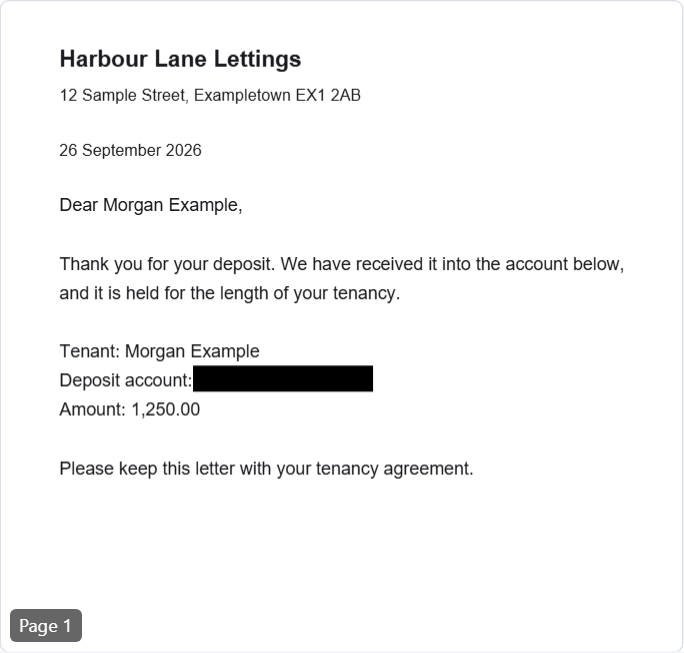
Now run it through pdftotext, a free command-line text extractor from Xpdf (here, version 4.06):
$ pdftotext -layout letter-boxed.pdf -
Harbour Lane Lettings

12 Sample Street, Exampletown EX1 2AB

26 September 2026

Dear Morgan Example,

Thank you for your deposit. We have received it into the account below,
and it is held for the length of your tenancy.

Tenant: Morgan Example
Deposit account: 0412 7788 3319 0000
Amount: 1,250.00

Please keep this letter with your tenancy agreement.
The account number is right there. You do not need a command-line tool to see it, either: in most viewers you can drag across the black box, copy, and paste the number into a text editor, or search the document for “0412” and watch the viewer highlight a hit under the black.
Other places a word can hide
The visible text is only the first place. A PDF can carry the same words in parts of the file that no page shows:
- Metadata. The document information dictionary and XMP metadata hold a title, an author, subject and keywords. This letter's author field says “Morgan Example”. Your viewer's Document Properties shows it.
- Replacement text. ActualText gives the text a screen reader or a search should use for a piece of the page, and it can say anything (ISO 32000-1, 14.9.4 “Replacement Text”).
- Comments, form fields and bookmarks, whose text lives outside the page's drawing instructions.
- Attachments, which are whole files inside the PDF.
- Earlier versions. A PDF can be saved by appending changes to the end of the file, so a version from before an edit can still be inside it.
What redaction means
The PDF specification describes redaction as two steps. First you mark the content to remove, which is what a redaction annotation is for; then the viewer applies the marks, “after which the content in the area specified by the redact annotations is removed”, and some marking appears in its place (ISO 32000-1, 12.5.6.23 “Redaction Annotations”). The removal is the part a drawn rectangle leaves out.
Adobe Acrobat Pro's Redact tool works this way — you mark text or areas, then apply the redactions — and Acrobat has a separate step for hidden information such as metadata, comments and hidden layers, which Adobe calls sanitizing (Adobe: Redact sensitive content, Adobe: Sanitize PDFs). Other redaction tools differ in how they do it, but the idea is the same: the words have to leave the file.
What RedactDrop does instead of drawing a box
RedactDrop takes the instructions that draw each word out of the page's content stream and paints the place black. Then it rebuilds the PDF from only what is needed to draw the pages, so metadata, replacement text, attachments and earlier versions are left out, and so are comments, form fields and bookmarks unless you choose to keep bookmarks, or the look of fields and comments drawn into the page. Finally it opens the new file again and checks it; if a page does not pass, no file is offered.
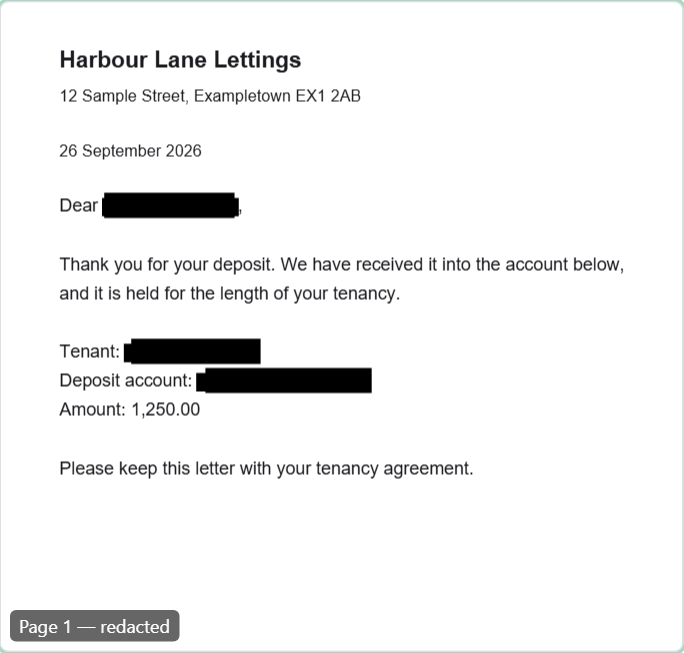
And the same extractor on RedactDrop's output:
$ pdftotext -layout letter-redacted.pdf -
Harbour Lane Lettings

12 Sample Street, Exampletown EX1 2AB

26 September 2026

Dear               ,

Thank you for your deposit. We have received it into the account below,
and it is held for the length of your tenancy.

Tenant:
Deposit account:
Amount: 1,250.00

Please keep this letter with your tenancy agreement.
The rest of the letter is unchanged and still selectable; only what you asked to remove is gone.
How to check a redacted PDF yourself
- Search it in your viewer for each word you removed, and for part of it — the last four digits of a number, a surname on its own.
- Select across the black areas, copy, and paste into a plain text editor.
- Look at Document Properties for a title, author or keywords that give something away.
- Open it in a second viewer, or run a text extractor such as pdftotext over it.
- Look at every page yourself. A check can only find what it looks for.
Remove the words, not just cover them. RedactDrop works in your browser and checks the result before you download it. Open the redaction page.
Questions
Is a black highlight the same as redaction?
No. A highlight or a filled shape is drawn on top of the text. The text is still in the file and can be copied, searched or extracted.
Does printing to PDF remove the hidden text?
Not reliably. Printing to PDF usually keeps text as text, so words under a drawn box can come through into the new file. It can also keep metadata such as the title.
How can I tell whether a PDF was redacted properly?
Search it for the words that were removed, copy across the black areas and paste the result into a text editor, look at the document properties, and open it in a second viewer or a text extractor.
Does RedactDrop redact scanned documents?
It does not read text in images, because it does no OCR. A box you draw over part of a scanned page replaces the image's pixels under it.